

Even more precise ephemerides of comets and asteroids generated directly by the JPL HORIZONS System
Orbital elements from the MPC or elsewhere are osculatory, meaning they change over time and are only valid for a limited period. Furthermore, Coelix calculations do not account for the effects of gravitational perturbations from objects other than the Sun, such as planets and large asteroids. Therefore, discrepancies can occur in some cases, especially when a comet or asteroid passes relatively close to Earth. Also, calculations using MPC orbital elements do not yield accurate results for comets and asteroids originating from outside the solar system and having eccentricities greater than 1.0.
To overcome these limitations, Coelix allows you to include ephemerides of comets and asteroids directly calculated by the JPL Horizons system. for a period you can specify, for example, one year before and after the date of an asteroid's opposition or a comet's perihelion passage. Outside of these dates, Coelix calculates ephemerides from orbital elements only.
When you then display the ephemeris table for a comet or asteroid in Coelix, an asterisk (*) in column (H) indicates that the ephemeris in that row comes from the JPL Horizons System. When you display the path of a comet or asteroid on a star map, the position takes into account the ephemeris from the JPL Horizons System.
Orbital elements from the MPC or elsewhere are osculatory, meaning they change over time and are only valid for a limited period. Furthermore, Coelix calculations do not account for the effects of gravitational perturbations from objects other than the Sun, such as planets and large asteroids. Therefore, discrepancies can occur in some cases, especially when a comet or asteroid passes relatively close to Earth. Also, calculations using MPC orbital elements do not yield accurate results for comets and asteroids originating from outside the solar system and having eccentricities greater than 1.0.
To overcome these limitations, Coelix allows you to include ephemerides of comets and asteroids directly calculated by the JPL Horizons system. for a period you can specify, for example, one year before and after the date of an asteroid's opposition or a comet's perihelion passage. Outside of these dates, Coelix calculates ephemerides from orbital elements only.
When you then display the ephemeris table for a comet or asteroid in Coelix, an asterisk (*) in column (H) indicates that the ephemeris in that row comes from the JPL Horizons System. When you display the path of a comet or asteroid on a star map, the position takes into account the ephemeris from the JPL Horizons System.
Comet and asteroid files and folders for the current version
How to add comets and asteroids from the JPL Horizons System
MPORTANT: The object must also already be listed among the comets or asteroids accessible via Coelix (MPC current comets, the first 2,000 current asteroids, favorite comets, favorite asteroids).
If it is not listed, you must update your information here or add it manually.
Here are the steps to add a comet or asteroid from the JPL Horizons system:
1- Go to the JPL Horizons System webpage: http://ssd.jpl.nasa.gov/horizons.cgi
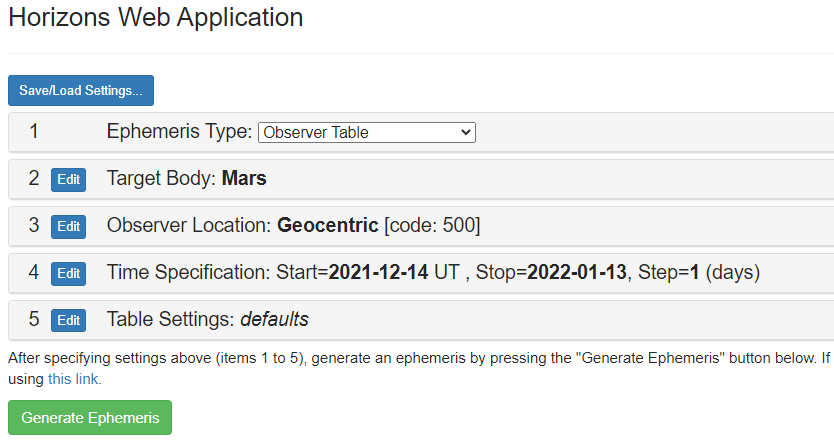
You will find an editable form allowing you to enter the parameters of the object whose ephemeris you want to display:
If it is not listed, you must update your information here or add it manually.
Here are the steps to add a comet or asteroid from the JPL Horizons system:
1- Go to the JPL Horizons System webpage: http://ssd.jpl.nasa.gov/horizons.cgi
You will find an editable form allowing you to enter the parameters of the object whose ephemeris you want to display:
2. Modify these parameters to obtain the ephemeris of the desired object in the format required by Coelix:
Ephemeris type: leave OBSERVER TABLE unchanged.
Target Body: choose the desired comet or asteroid.
Observer location: leave Geocentric [500]. Coelix will calculate the topocentric coordinates.
Time Specification:
Start: one year before the opposition of an asteroid or the perihelion of a comet;
Stop: one year after the opposition of an asteroid or the perihelion of a comet;
Step: choose a two-day interval.
(Note: you can choose different values ??in the case of a very fast-moving near-Earth asteroid such as 2012 DA14, for example, a one-hour interval and ten days before and after opposition for Start and Stop).
Table Settings:
Keep only options #1, #9, #18, and #19. Deselect all others.
Date/Time Format: Calendar and Julian Day Number;
Calendar Type: Mixed;
Time Digits: HH:MM;
Angle Format: Decimal degrees.
Leave all other options unchanged.
Ephemeris type: leave OBSERVER TABLE unchanged.
Target Body: choose the desired comet or asteroid.
Observer location: leave Geocentric [500]. Coelix will calculate the topocentric coordinates.
Time Specification:
Start: one year before the opposition of an asteroid or the perihelion of a comet;
Stop: one year after the opposition of an asteroid or the perihelion of a comet;
Step: choose a two-day interval.
(Note: you can choose different values ??in the case of a very fast-moving near-Earth asteroid such as 2012 DA14, for example, a one-hour interval and ten days before and after opposition for Start and Stop).
Table Settings:
Keep only options #1, #9, #18, and #19. Deselect all others.
Date/Time Format: Calendar and Julian Day Number;
Calendar Type: Mixed;
Time Digits: HH:MM;
Angle Format: Decimal degrees.
Leave all other options unchanged.
3. Click the "Generate Ephemeris" button to obtain the ephemeris table, which appears further down the webpage.
4. In the resulting table, select only the text located between the $$SOE markers. Do not include these markers and check the alignment; otherwise, the software may stop working. Examine the existing files provided as examples.
5. Copy the selected text into Notepad++. Verify that you obtain a well-aligned document that resembles the following example given for the asteroid Flora:
4. In the resulting table, select only the text located between the $$SOE markers. Do not include these markers and check the alignment; otherwise, the software may stop working. Examine the existing files provided as examples.
5. Copy the selected text into Notepad++. Verify that you obtain a well-aligned document that resembles the following example given for the asteroid Flora:
6. Save the text file from Notepad++ in the asterhp3 folder (for an asteroid) or comethp3 folder (for a comet) of Coelix, following these naming conventions:
For a numbered asteroid, the filename must begin with a_ followed by the seven-digit asteroid number, for example, 0000008 for Flora, resulting in a_0000008.txt for Flora.
For an unnumbered asteroid, the filename must also begin with a_ followed by the year and the asteroid's designation in uppercase letters, with spaces replaced by underscores, resulting in a_2012_DA14.txt for the near-Earth asteroid 2012xDA14.
For a comet, the filename is the comet's name with separators and spaces (but not hyphens) replaced by underscores, resulting in, for example, 46P_WIRTANNEN.txt,
C_2012_S1_ISON.txt, 41P_TUTTLE-GIACOBINI-KRESAK.txt, etc. Use only uppercase letters.
7- Test your new file in Coelix by displaying an ephemeris table for the object (comet or asteroid). Also verify that there is an asterisk (*) in column (H) of the table for dates within the limits of the ephemeris calculated by the JPL Horizons system and that there are no asterisks outside these dates. It is normal that three days are missing at the beginning and end of the time limits chosen to allow for interpolation by Coelix.
For a numbered asteroid, the filename must begin with a_ followed by the seven-digit asteroid number, for example, 0000008 for Flora, resulting in a_0000008.txt for Flora.
For an unnumbered asteroid, the filename must also begin with a_ followed by the year and the asteroid's designation in uppercase letters, with spaces replaced by underscores, resulting in a_2012_DA14.txt for the near-Earth asteroid 2012xDA14.
For a comet, the filename is the comet's name with separators and spaces (but not hyphens) replaced by underscores, resulting in, for example, 46P_WIRTANNEN.txt,
C_2012_S1_ISON.txt, 41P_TUTTLE-GIACOBINI-KRESAK.txt, etc. Use only uppercase letters.
7- Test your new file in Coelix by displaying an ephemeris table for the object (comet or asteroid). Also verify that there is an asterisk (*) in column (H) of the table for dates within the limits of the ephemeris calculated by the JPL Horizons system and that there are no asterisks outside these dates. It is normal that three days are missing at the beginning and end of the time limits chosen to allow for interpolation by Coelix.
If you have a problem, you can check the contents of the files that are already in the asterhp3 and comethp3 folders of Coelix.
You can find the files for comets whose ephemerides come from the HORIZONS system in the comethp3 folder.
Similarly, for asteroids, the asterhp3 folder contains the files for asteroids whose ephemerides come from the HORIZONS system. The filenames include the asteroid numbers, for example, a_0000008.txt for Iris, asteroid number 8 (Flora).
If the object is not in one of these folders, you can add it yourself by following the instructions in the following sections.
If you are unable to do so, you can request that we send you the file by email. See the Contact and Links section.
Similarly, for asteroids, the asterhp3 folder contains the files for asteroids whose ephemerides come from the HORIZONS system. The filenames include the asteroid numbers, for example, a_0000008.txt for Iris, asteroid number 8 (Flora).
If the object is not in one of these folders, you can add it yourself by following the instructions in the following sections.
If you are unable to do so, you can request that we send you the file by email. See the Contact and Links section.
You obtain these values ??for the choice of asteroid 8 Flora, which is in opposition on July 9, 2026:



NGC7000 H alpha JV



























